

How to manage Quota Settings
This article provides a step-by-step guide on how to manage quota settings for your hotel. Understanding and properly configuring quota settings allows you to optimize room availability and streamline booking processes across various channels. Follow the instructions below to efficiently set up and manage your quota periods and availability.
How to set up a Quota Period
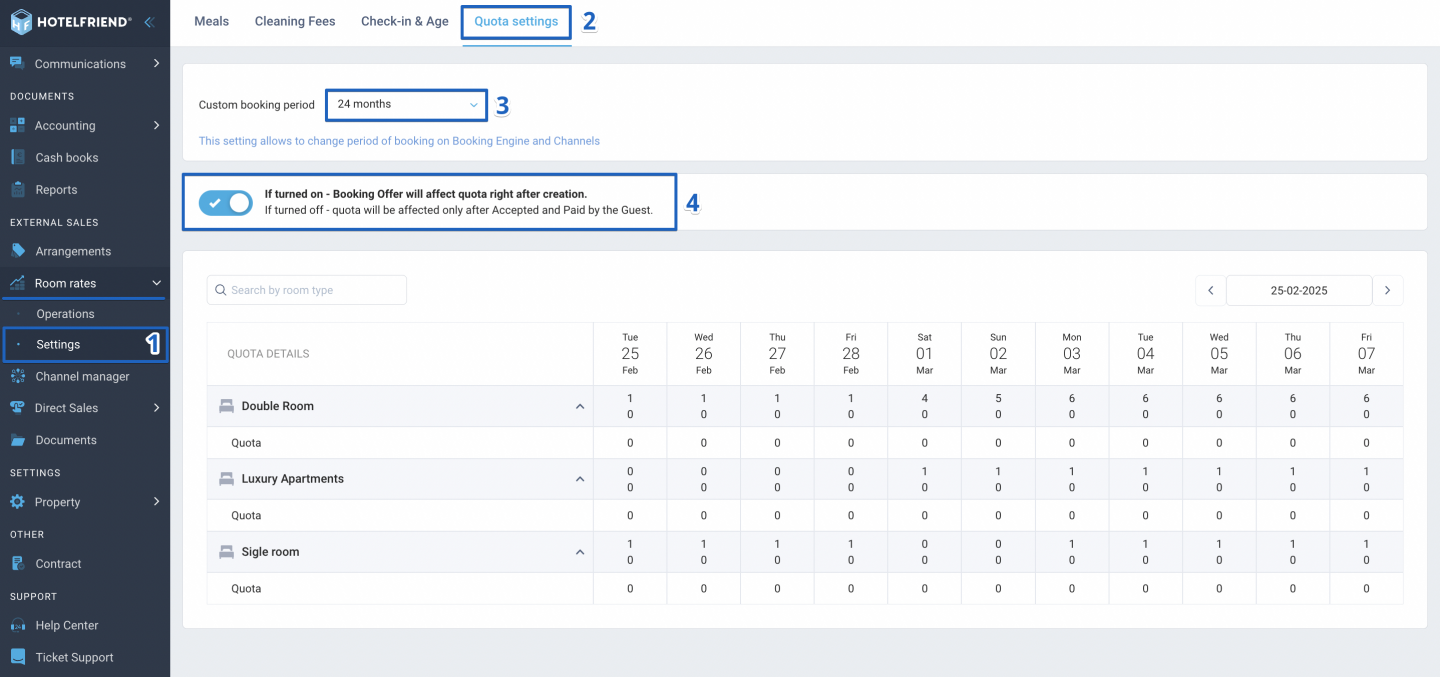
- In the menu on the left-hand side of your dashboard go to Room Rates and select Settings from the dropdown menu.
- Locate and click on the Quota settings tab.
- Under Custom booking period, pick the desired period from the dropdown menu. This setting will dictate how your quota period is displayed on both the Booking Engine and various Channels.
- Turn the toggle on to allow Booking Offers to impact quota immediately upon creation. Switch the toggle off to delay the impact until the offer has the status “Accepted” and “Paid by the Guest”.
Author:

Uliana Karakhanian
Head of Customer Support
Uliana is an influential voice behind our blog's informative content. With 5 years of experience, she takes pride in empowering our clients and witnessing their success with our solutions. Beyond her role in customer support, Uliana finds joy in sports and exploring the depths of psychology. Expect insightful articles reflecting her commitment to simplifying your daily workflow.
