
Product Updates v4.36 & v4.37: Smarter Reservations, Payments, Automations & Accounting
Discover HotelFriend Product Updates v4.36 & v4.37 with smarter reservations, clearer payments, DATEV cash book export, arrival emails, group booking tools, and kiosk improvements.
Sep 15, 2026 7:43 AM
Product Updates v4.36 + v4.37 improve reservations, payments, communication, accounting, group bookings, and self-service workflows: hoteliers get clearer payment information, smarter arrival emails, more flexible guest and payer views, DATEV-ready cash book exports, faster bulk check-in and check-out updates, and smoother package and kiosk management - saving time and giving hotel teams greater control over daily operations.
1. Reservations & Front Desk
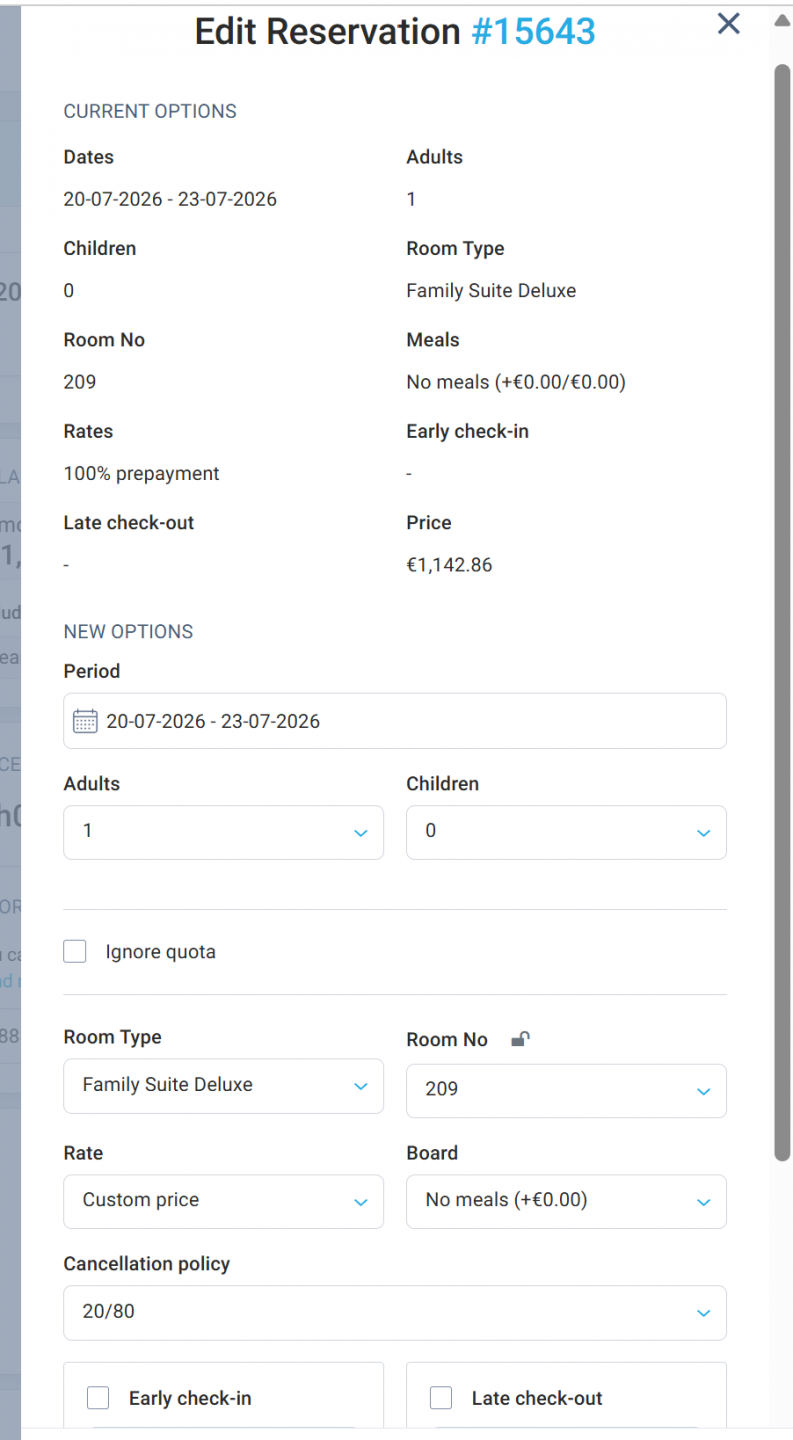
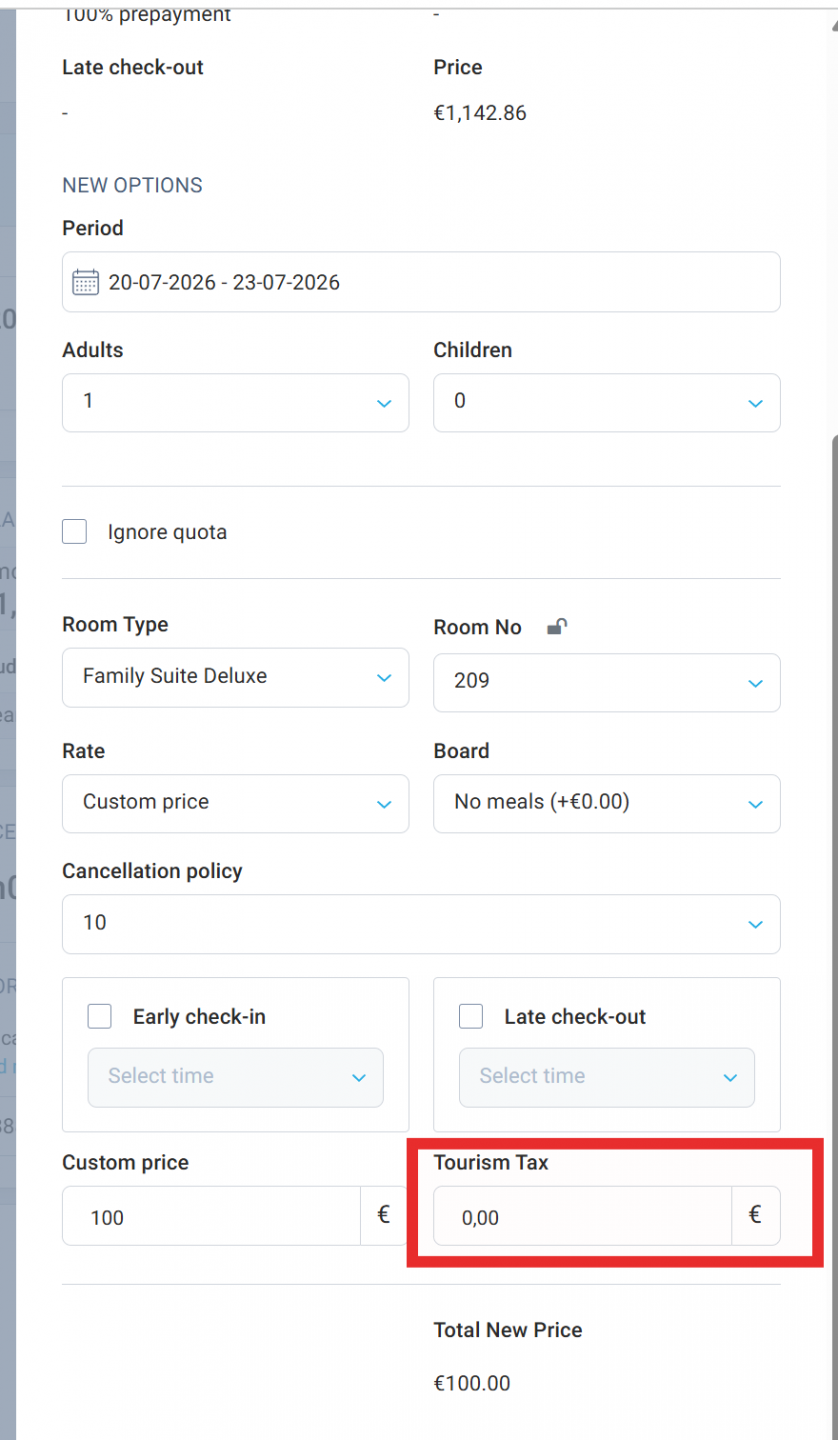
City Tax now stays in place when using a Custom price
Adjusting a reservation price no longer means having to restore the City Tax manually.
When you switch a room rate to Custom price in the Edit Reservation modal, the existing City Tax remains attached to the reservation and is also preserved in Charges.
- The existing City Tax stays unchanged when switching to Custom price.
- The tax is displayed next to the Custom price field.
- Switching back to a regular room rate recalculates the City Tax according to its configuration.
- A new hint explains how the room price and City Tax are distributed across the nights of the stay.
This makes manual price adjustments safer and faster, especially when reception teams need to modify rates without changing the tax itself.
See guests and payers in separate columns
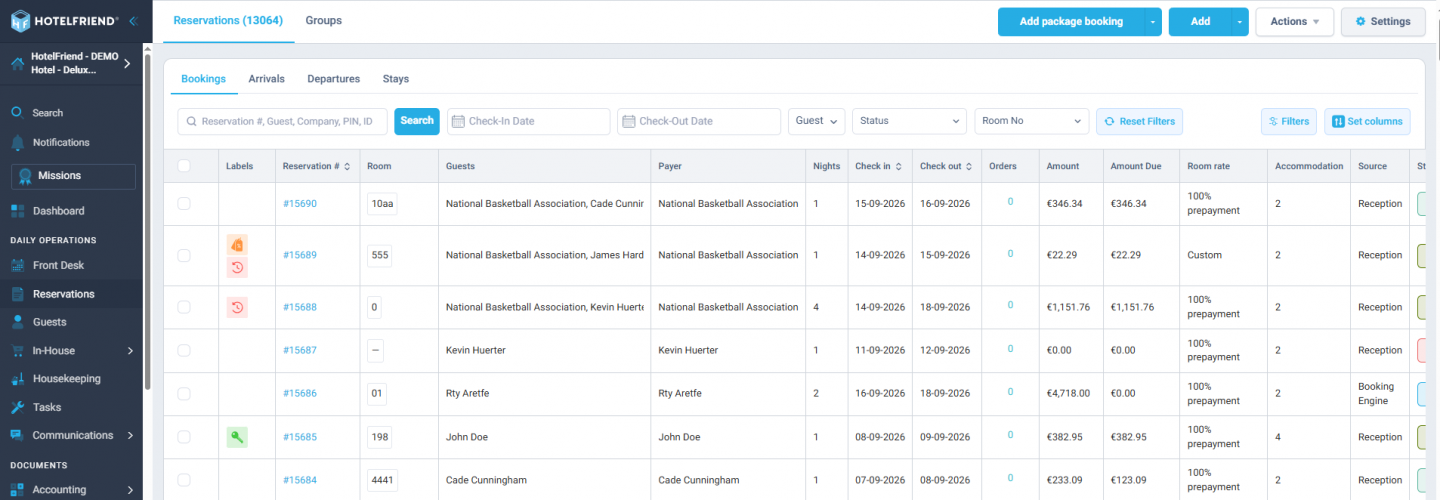
The Reservations grid can now show the person staying at the hotel and the person or company responsible for payment separately.
The Guests column displays only the guests staying in the room, while the new Payer column shows who is responsible for payment.
- The new Payer column can be enabled in the column settings.
- Hotels can still display the guest and payer together using the Show Payer with the guest setting.
- Existing configurations remain unchanged after the update.
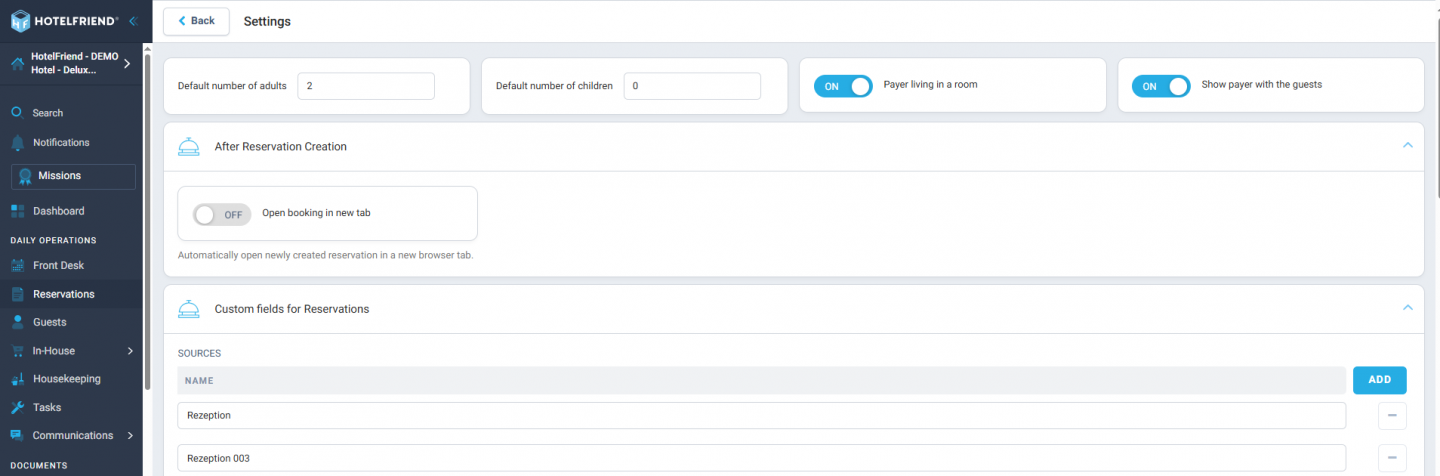
This gives front desk teams a clearer overview of who is actually staying and who should be billed, especially for company bookings and reservations made on behalf of another guest.
Open new reservations and guest profiles in a new tab
Newly created reservations and guest profiles can now open automatically in a new browser tab, while the original page stays open.
This makes it easier to review newly created records without losing your current place or workflow.
Reservations are now displayed reliably on mobile
The Reservations grid now loads correctly on mobile devices across different hotel configurations.
This makes it easier for hotel teams to access reservation information from smartphones without encountering an empty grid.
Manage Early Check-in and Late Check-out in bulk
Early Check-in and Late Check-out can now be updated for a whole group or for multiple selected reservations in one step.
A new mass action lets hotel teams set a new check-in or check-out time and apply an Early Check-in or Late Check-out option to several reservations at once.
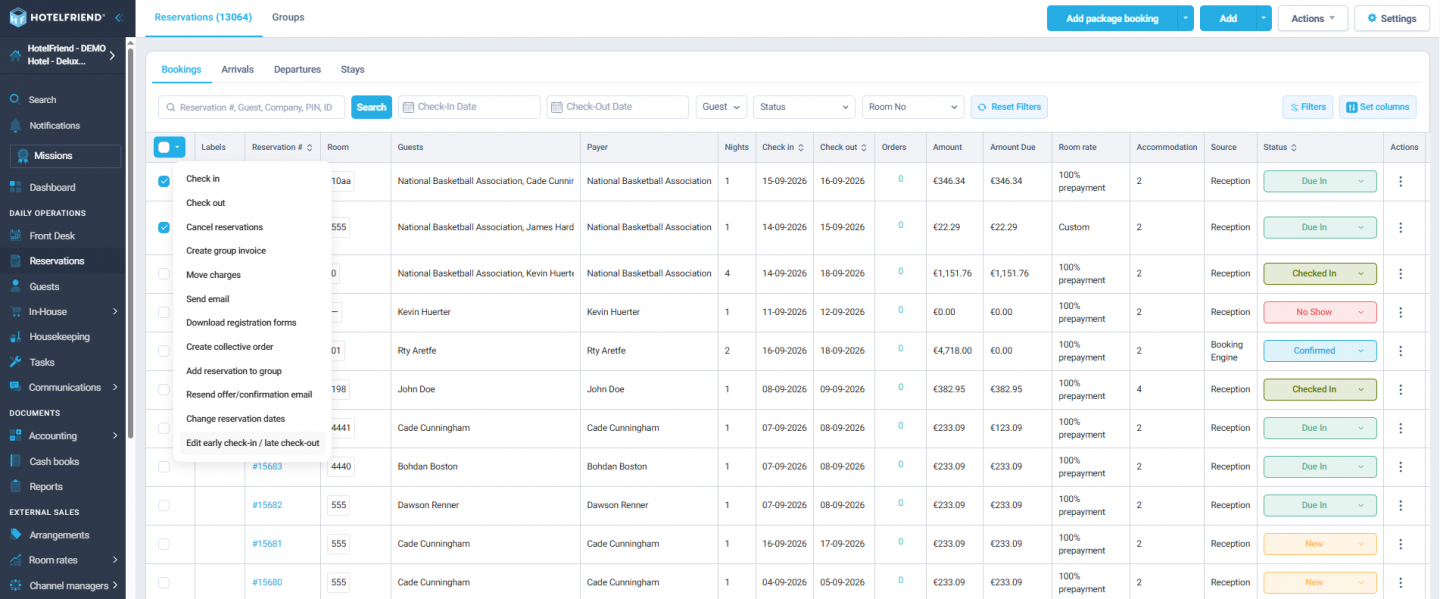
- Update check-in and check-out times for multiple reservations together.
- Apply available Early Check-in or Late Check-out options in bulk.
- Paid options are added to each reservation according to their configured price.
- Free options can be applied without creating additional charges.
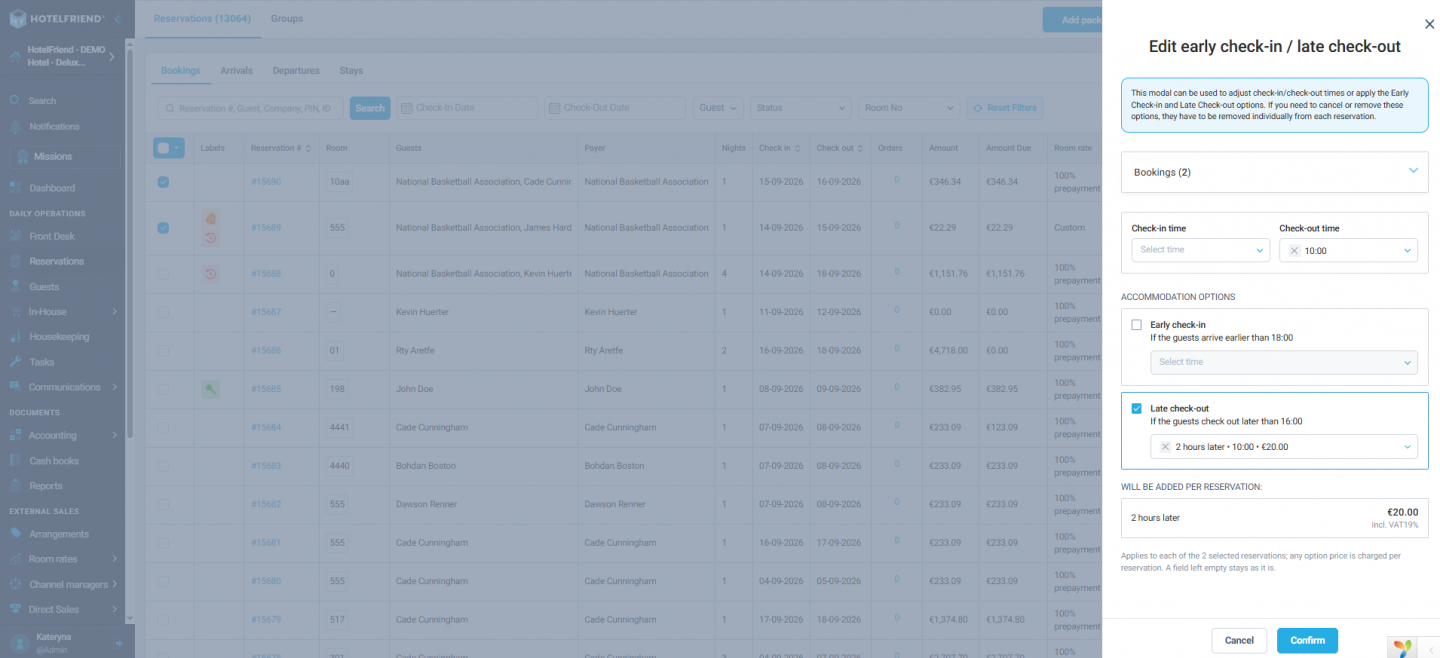
This is particularly useful for group bookings, where adjusting dozens of reservations individually can take unnecessary time.
More reliable action menus
Three-dot action menus across reservation cards and other system views are now easier to use.
Previously, a menu could sometimes close while the cursor was moving from the action icon to one of its options. The interaction area has been improved so menus remain accessible while an action is being selected.
This small change removes unnecessary clicks from frequently used workflows.
Cleaner reservation status selection in German
The reservation status dropdown has also been refined for longer German labels.
Status options now remain properly aligned regardless of label length, resulting in a cleaner and more consistent interface for German-speaking teams.
2. Payments, Invoicing & Accounting
Clearer payment information at a glance
We have refined the payment block so that outstanding amounts are easier to understand.
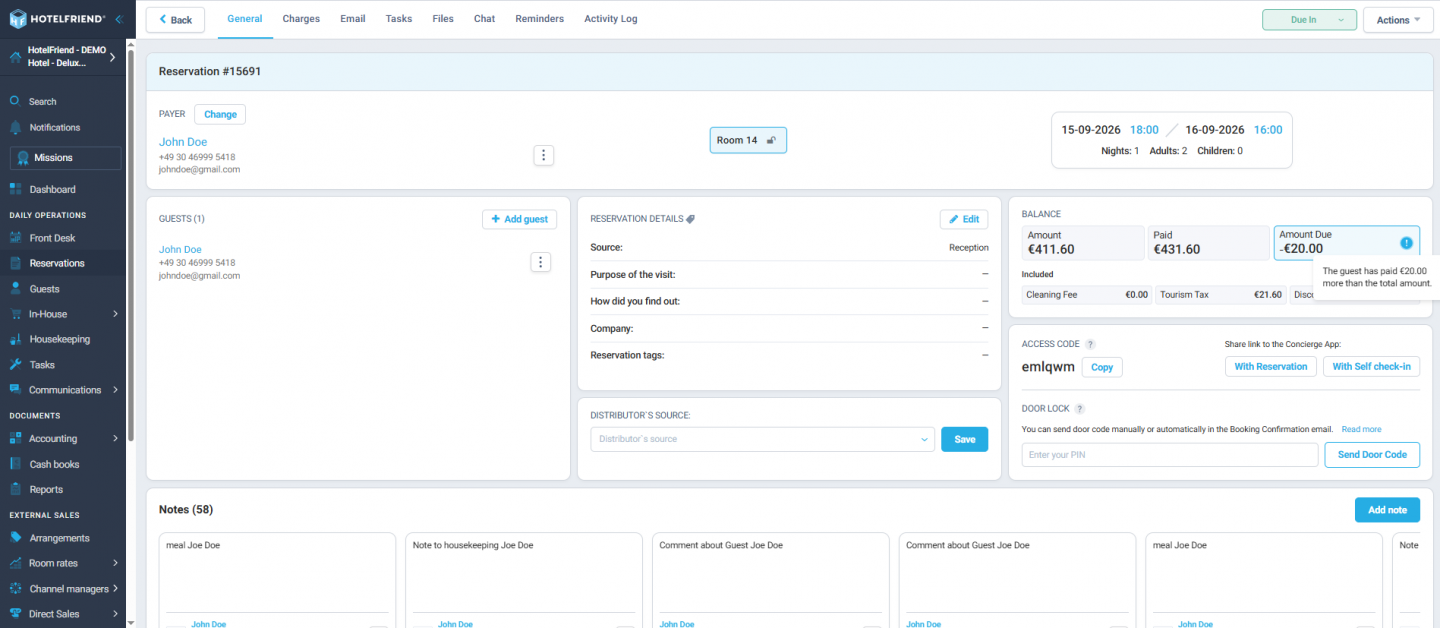
The previous Balance value is now shown as Amount Due, while the German interface uses Offener Betrag.
- €0.00 is shown in green when nothing remains to be paid.
- Outstanding amounts are highlighted in yellow.
- If a guest has paid more than the reservation total, the corresponding amount is shown together with a clear overpayment message.
The result is a more straightforward payment overview, helping staff immediately understand whether a reservation is fully paid, still has an amount due, or has been overpaid.


Show packages as one line in emails and invoices
Hotels now have more control over how packages are presented to guests.
A new setting, Show package services as separate items, determines whether all services included in a package are listed individually or displayed as a single package line with one total.
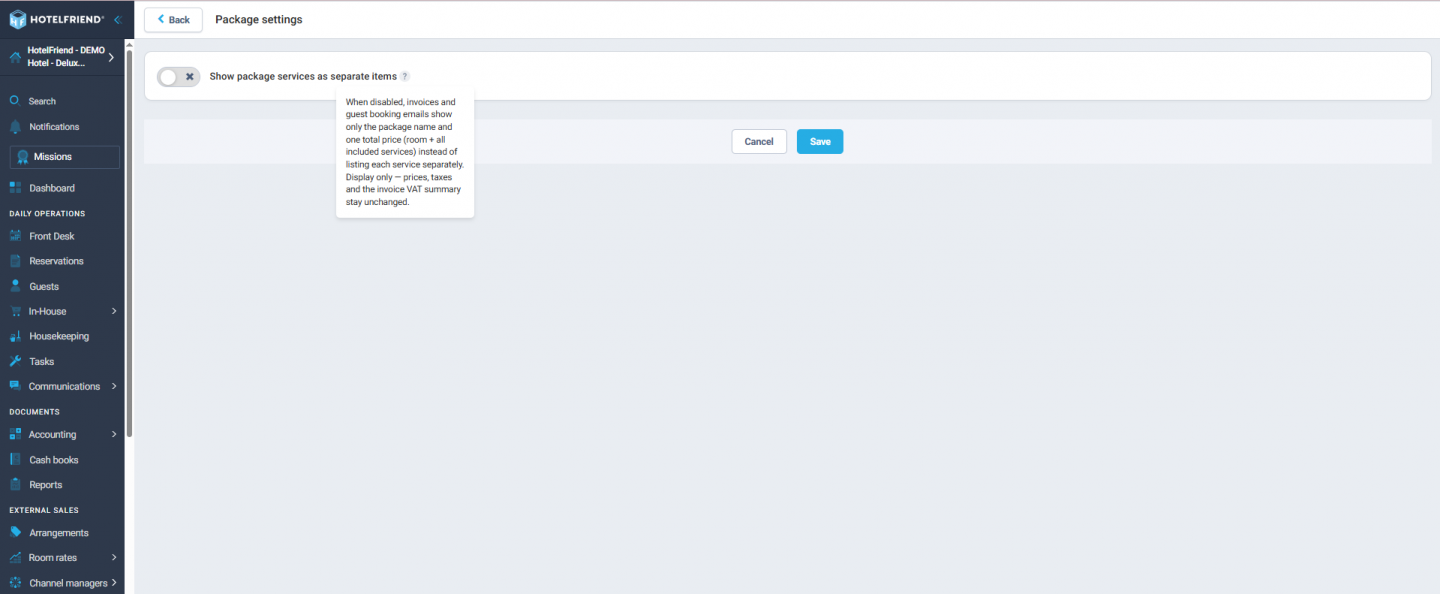
When the setting is switched off:
- booking confirmations and offers show the package name and total price instead of every included service;
- paid confirmation emails follow the same simplified format;
- invoices display one Package line instead of the individual package components;
- services ordered separately remain itemized.
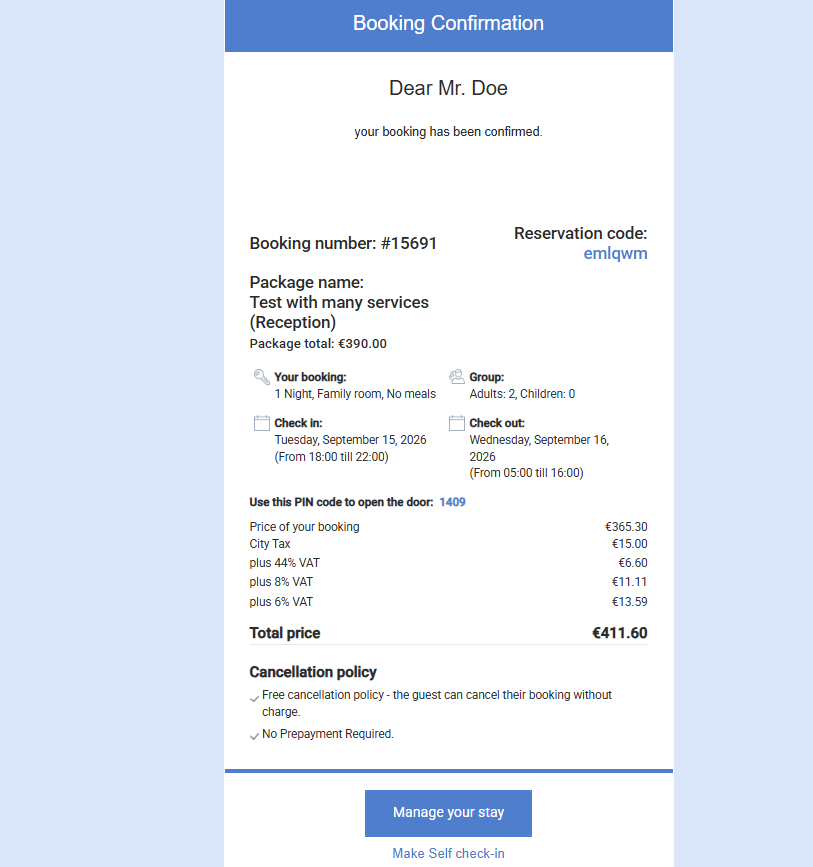
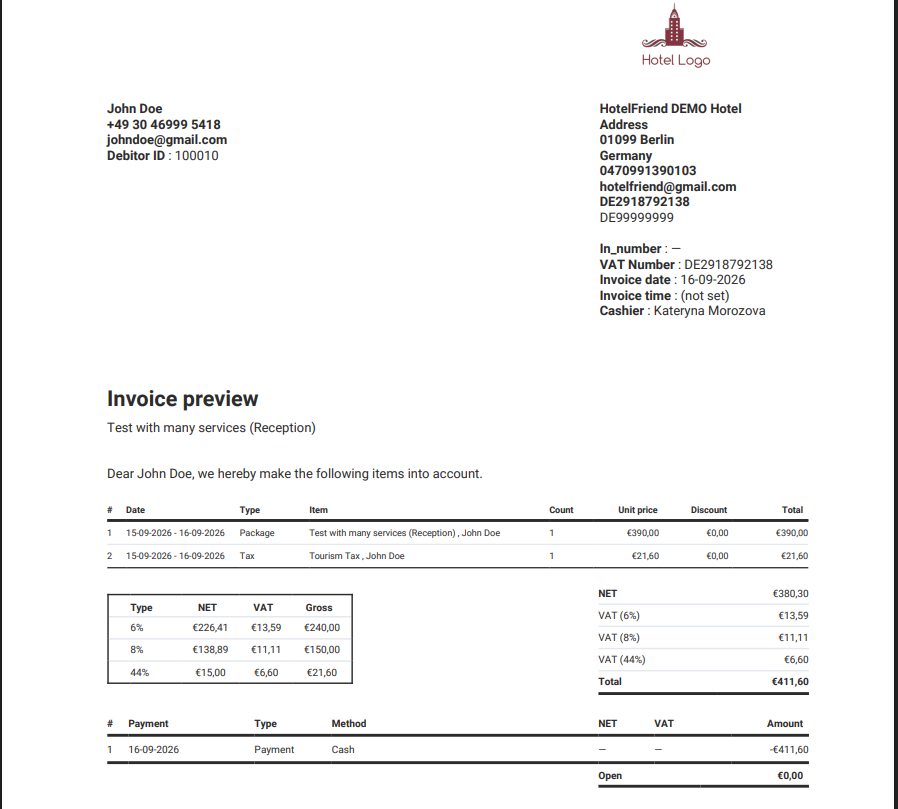
This changes only how the package is displayed. Pricing, folio entries, tax calculations, and the VAT summary remain unchanged.
Export cash books for DATEV
Cash book data can now be prepared for DATEV directly from HotelFriend.
Hotels can select a cash book and date range and generate an export package containing the files needed for accounting workflows.
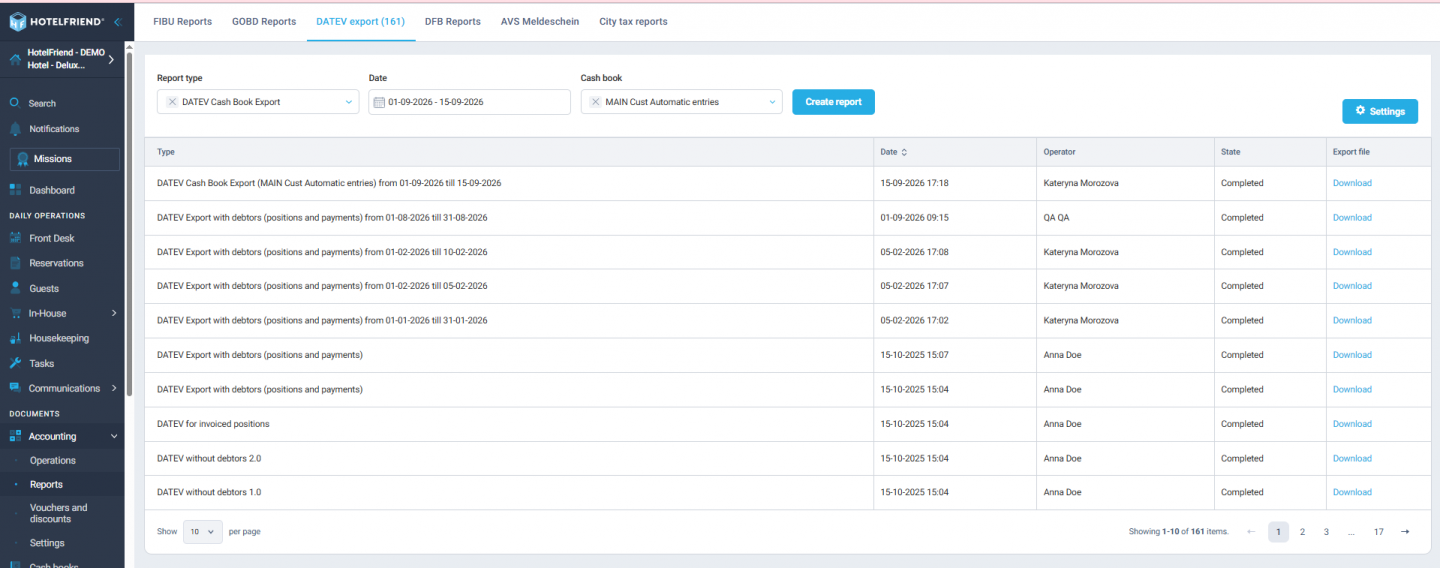
The export can include:
- a DATEV booking batch in CSV format;
- a printable cash book overview with opening, running, and closing balances;
- attached receipt PDFs and their DATEV description file for Unternehmen online.
Each cash book can also use its own DATEV cash account, while configured tax keys and cost points are included automatically where applicable.
Every generated export is saved separately in the report list, making it easier to prepare accounting data for a tax advisor without overwriting previous exports.
Hotel branding is now used consistently on invoices
Invoices and order overviews now use the hotel logo configured in Communication settings → Email Customization instead of displaying the HotelFriend logo.
If no hotel logo has been uploaded, the document is generated without a logo.
This keeps guest-facing documents consistent with the hotel's own branding.
More reliable invoice previews and PDF creation
Invoice preview and creation are now more reliable when a hotel uses very large logo or footer images.
The system now handles oversized image files more safely, preventing them from blocking invoice PDF generation.
Invoice-related errors are also displayed more clearly, with readable error messages instead of raw technical responses, making it easier for hotel teams to understand when an action could not be completed.
3. Communication & Automations
Send arrival emails immediately for same-day bookings
Arrival communication is now more reliable for last-minute reservations.
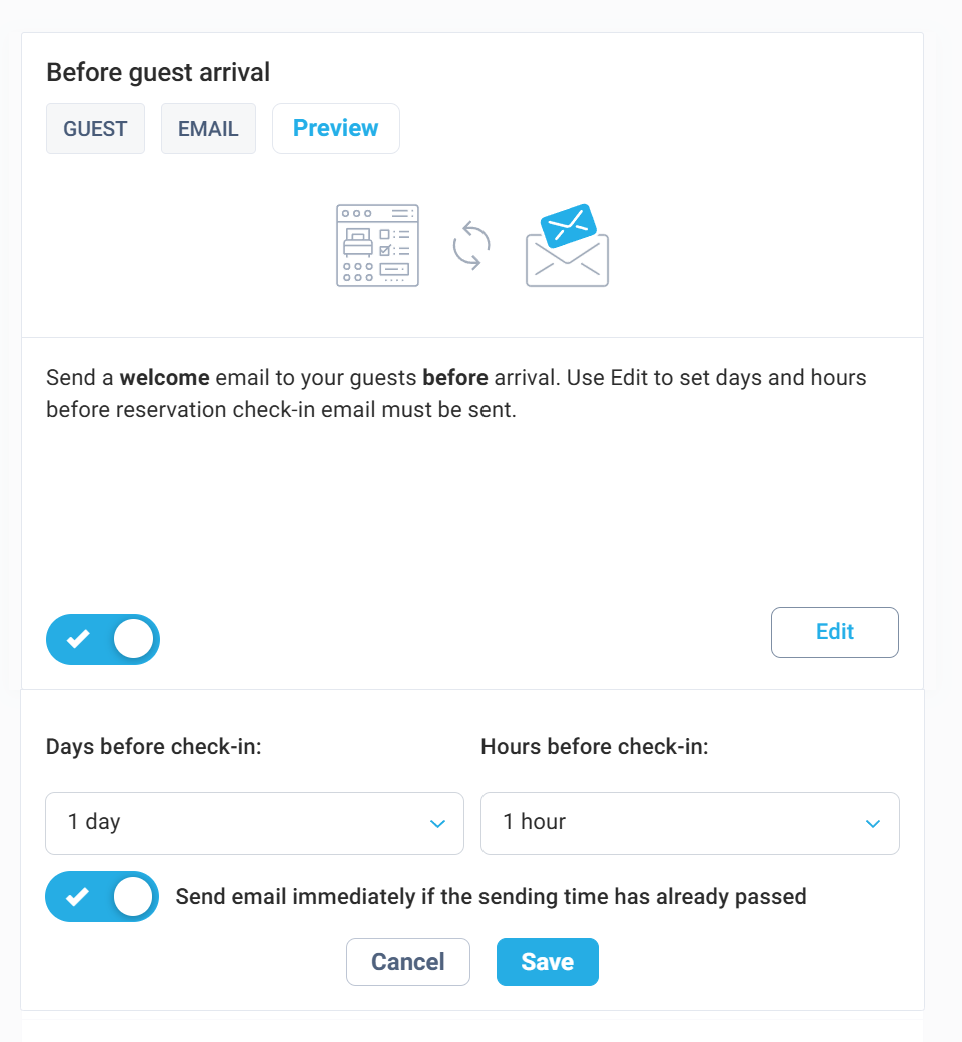
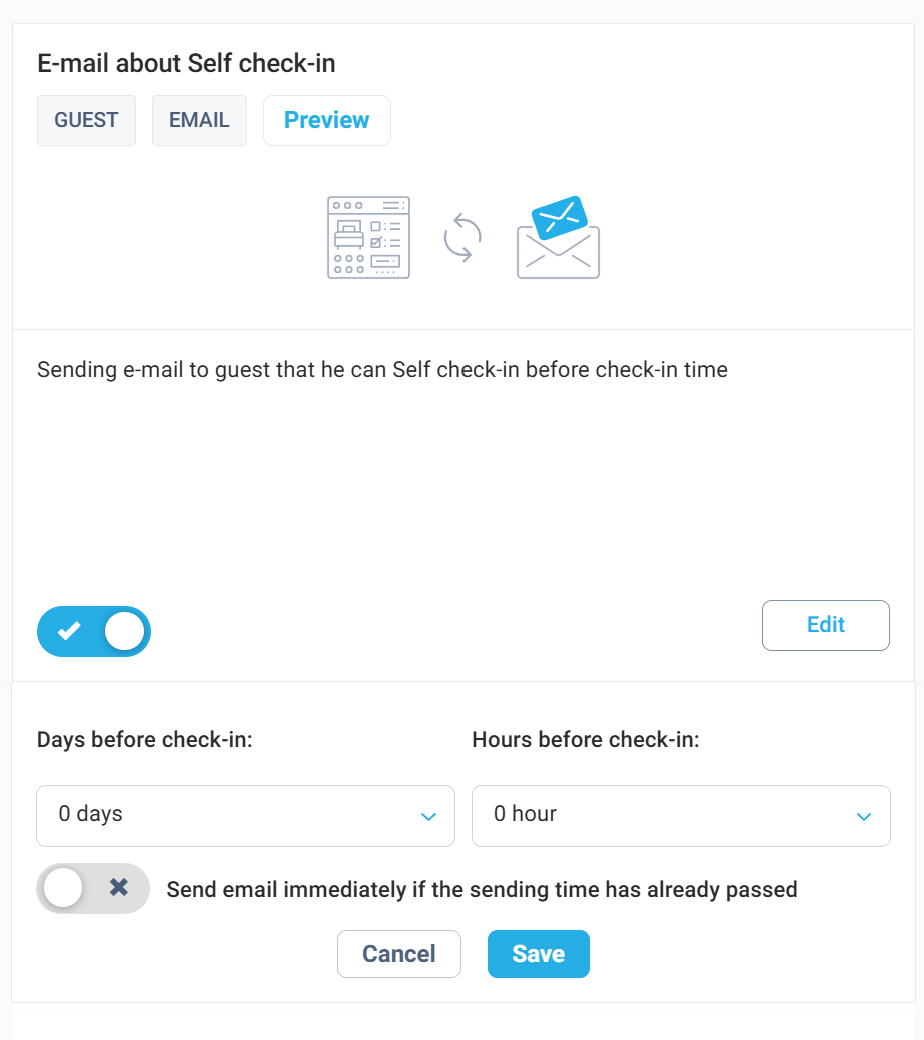
A new optional setting is available for the Before Guest Arrival and Email about Self Check-in automations:
“Send email immediately if the sending time has already passed.”
When enabled, the email is sent immediately if:
- the guest is checking in today, and
- the reservation is created after the originally configured sending time.
The same logic applies when an existing reservation is changed so that its check-in date becomes today.
For example, if your Self Check-in email is normally scheduled for 2 PM and a guest books at 5 PM for arrival that same evening, HotelFriend can now send the message immediately instead of missing the automation window.
This is particularly useful for self-service properties where guests rely on arrival instructions, access information, or door codes before reaching the hotel.
The option is disabled by default, so your existing automation behaviour remains unchanged unless you choose to activate it.
Clearer feedback when sending emails to multiple contacts
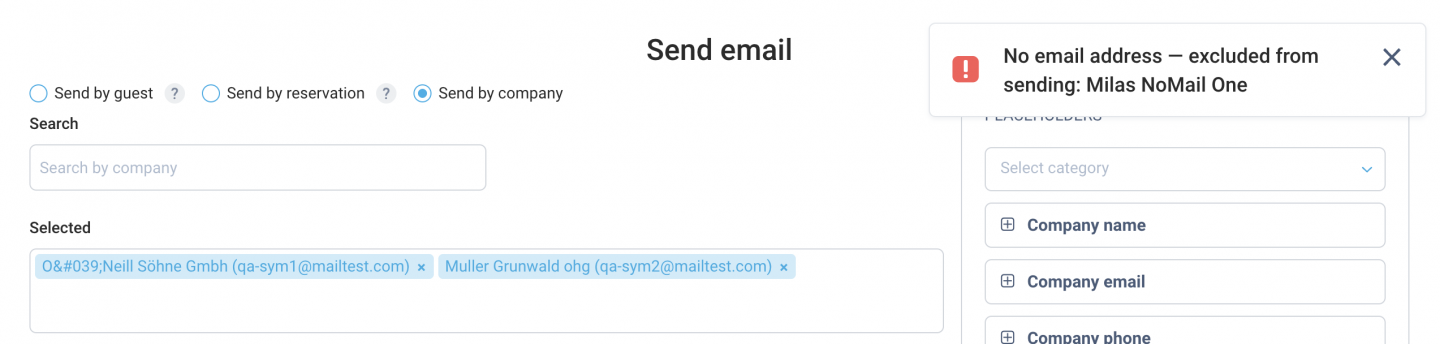
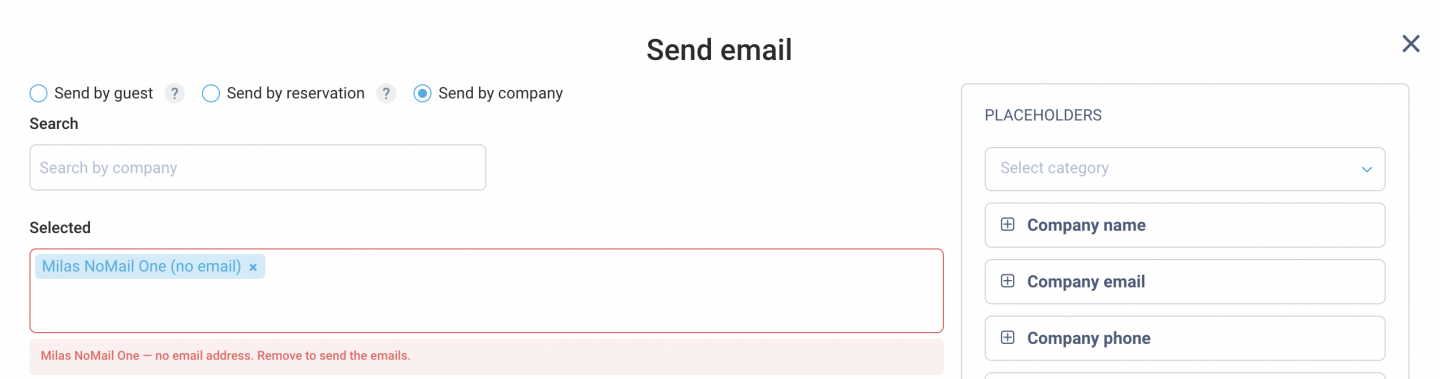
Bulk email sending now makes it much easier to spot contacts without an email address.
When guests or companies are selected for an email:
- contacts without an email address are clearly identified instead of being silently excluded;
- a notification shows which contacts cannot receive the message;
- the Selected field provides a clear warning before sending;
- companies are displayed with both their name and email address for easier identification.
This gives hotel teams better visibility over their recipient list and reduces the risk of assuming that a message was sent to someone who could not receive it.
Booking Engine reservations now preserve guest email preferences
Existing guest communication preferences are now preserved when the guest makes another reservation through the Booking Engine.
Previously, Marketing emails and Notification emails could be switched off automatically for an existing guest after a new Booking Engine reservation.
The guest's existing preferences now remain unchanged unless the booking explicitly updates them, helping ensure that important messages such as arrival information and self check-in instructions continue to reach the guest.
Special characters are displayed correctly in email recipients
Company and guest names containing characters such as &, apostrophes, quotation marks, or angle brackets are now displayed correctly in the Send Email workflow.
Names appear as entered in the system instead of being shown as HTML code, making recipient lists and warnings easier to read.
4. German Language & Terminology
We have reviewed and improved German wording throughout HotelFriend to make terminology clearer and more consistent for everyday hotel operations.
Updates appear across system views, email templates, PDFs, widgets, and reports.
Among the changes:
- Gebühren → Posten
- Buchungsbeschränkungen → Restriktionen
- Due In / Due Out → Anreise erwartet / Abreise erwartet
- Herkunftsland → Adresse where the field refers to the guest address
- Hotel/Booking Tags → Reservation Tags / Reservierungs-Tags
- Balance / Einzahlung → Amount Due / Offener Betrag
- Channel manager → Channel Manager
Guest type terminology has also been refined to Private guest / Company in English and Privatgast / Firma in German.
These updates make the interface more natural for German-speaking users and help keep terminology consistent across different parts of the platform.
5. Reports
More complete Check-ins reports
The Check-ins report now provides a more accurate view of upcoming stays.
- The report shows the guest's Departure date instead of repeating the arrival date.
- Reservations without an assigned room are now included instead of being omitted.
This gives hotel teams a more complete daily overview, even when room assignment has not yet been finalized.
6. Resource Planner
Select Custom Dates as a range
Adding orders across multiple custom dates is now much faster.
Instead of selecting every day individually, you can choose a start date and an end date in the calendar, and all dates in between are selected automatically.
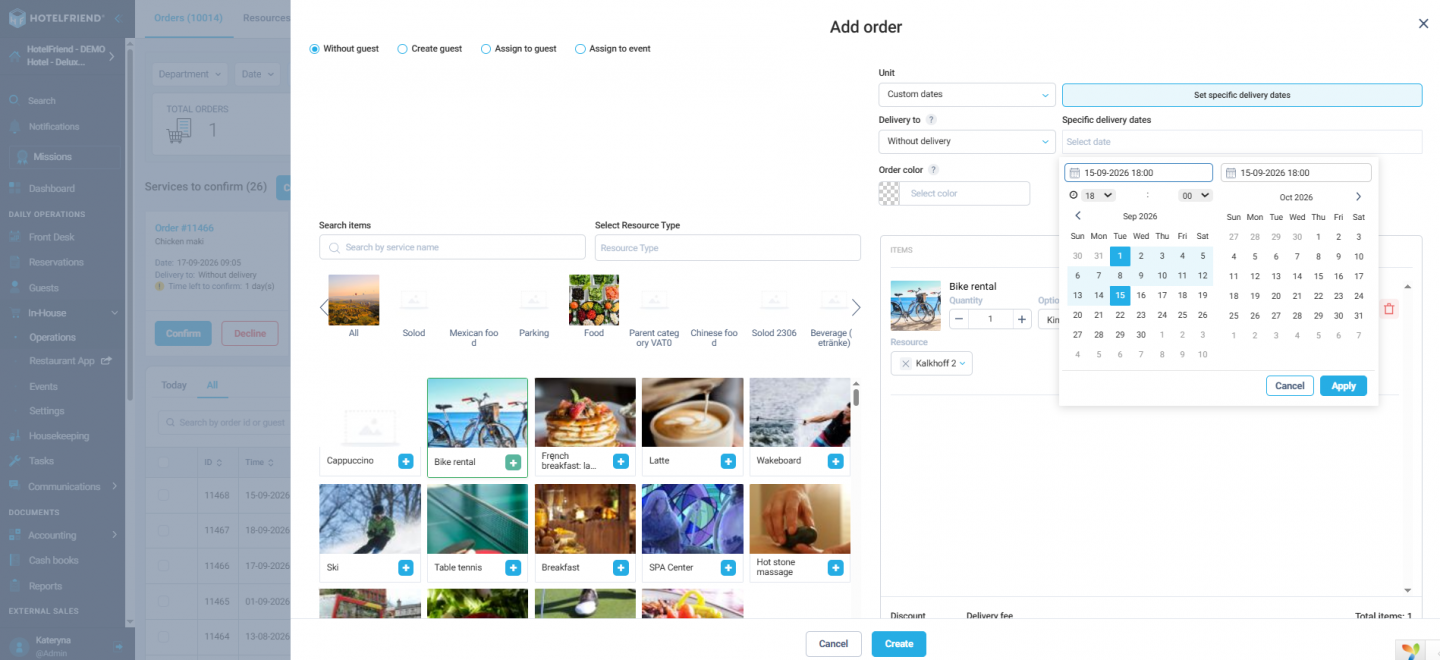
Individual dates within the range can still be removed, and additional dates can be added when needed.
This significantly reduces the number of clicks required for longer orders while keeping the existing order and pricing logic unchanged.
7. Events
Smoother Event Type validation
We have refined validation in Event fields and Event schedule fields.
Opening the Type selector no longer causes the form layout to resize unexpectedly or moves the page away from the section you are working on.
The improvement keeps event setup stable and easier to navigate, particularly when creating or editing more detailed event configurations.
8. Self Check-in Kiosk
More flexible and transparent self check-in
The Check-in Kiosk receives several improvements designed to make the self-service flow clearer for both hotels and guests.
A new hotel-level setting, Require guest signature on Self Check-in, allows properties to decide whether a guest signature is required during the process.
- The signature requirement is enabled by default, so existing behaviour remains unchanged.
- Hotels can disable the signature step when it is not required.
- The Registration Form is still generated even when no signature is collected.
- Card instructions can adapt to the type of card device used by the hotel.
- Key encoding can show in-progress, successful, or failed status feedback.
These improvements make self check-in more adaptable to different hotel setups and give guests clearer feedback while their room key is being prepared.
Across Product Updates v4.36 and v4.37, HotelFriend continues to simplify everyday hotel operations with clearer reservation and payment workflows, more targeted guest communication, stronger accounting tools, faster group management, and more flexible self-service processes.
Together, these improvements reduce repetitive work, make important information easier to understand, and give hotel teams more control from reservation creation and guest arrival through invoicing, reporting, and check-in.
Learn more about the System Explore Pricing
