

Detailed Room Overview in HotelFriend Booking Engine
HotelFriend’s Booking Engine offers a comprehensive way for guests to book multiple rooms and explore detailed information about each room type. By customizing the booking button and selecting the “Detailed table” display overview, you can help your guests make more informed decisions when booking their accommodations.
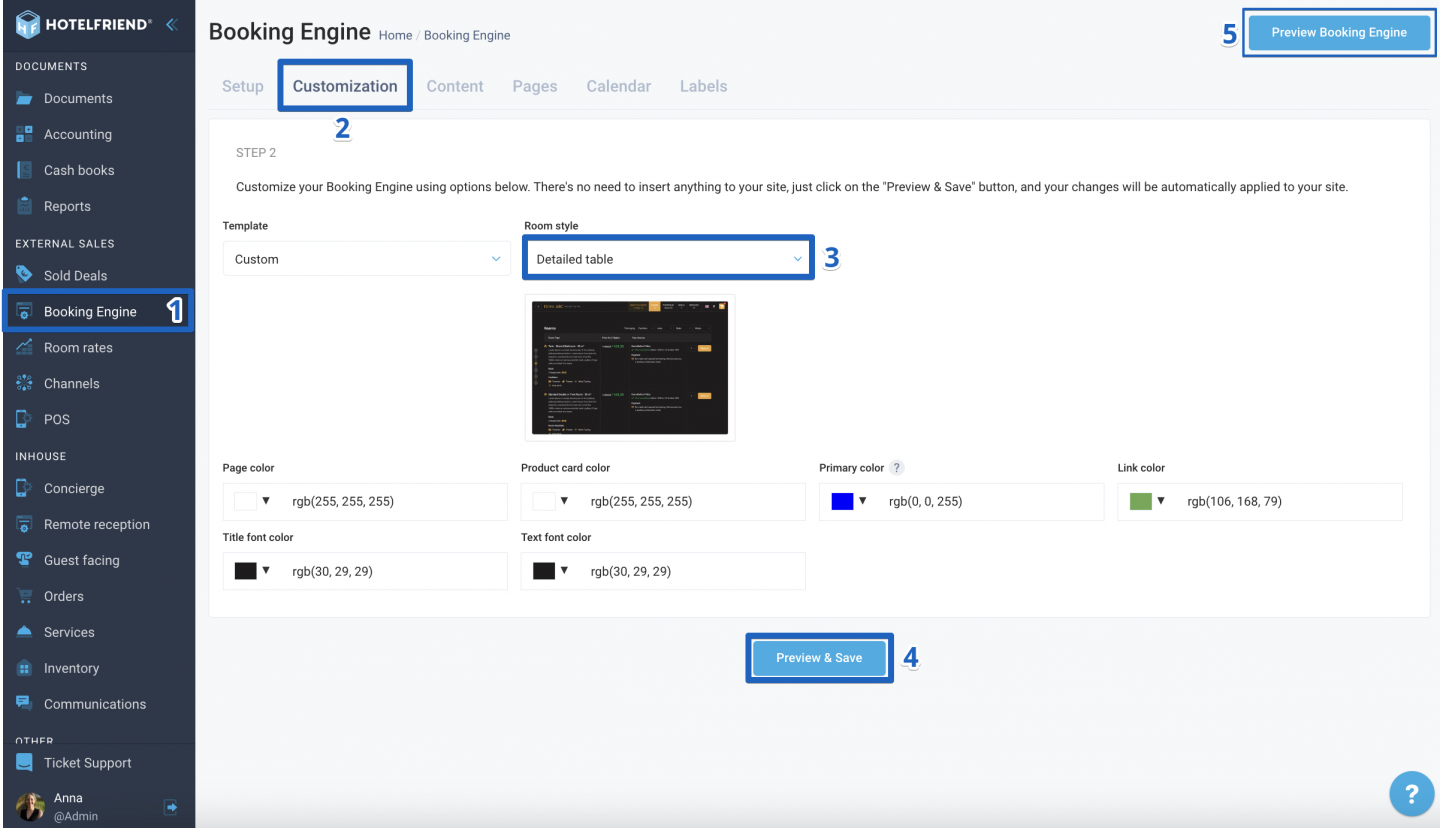
To enable a detailed room overview on the Booking Engine, follow these steps:
- From the menu on the left, select the Booking Engine module.
- Go to the Customization tab.
- In Room Style, choose the Detailed table option from the dropdown list.
- Click Preview & Save.
- In the top right corner, click Preview Booking Engine and check the page display type.
Explore alternative display options
If needed, you can switch to other types of room overviews. Just switch the display type in the Room Style field, save the changes, and the system will promptly reflect the updates on your website.
Author:

Uliana Karakhanian
Head of Customer Support
Uliana is an influential voice behind our blog's informative content. With 5 years of experience, she takes pride in empowering our clients and witnessing their success with our solutions. Beyond her role in customer support, Uliana finds joy in sports and exploring the depths of psychology. Expect insightful articles reflecting her commitment to simplifying your daily workflow.
