OPTIMIZE YOUR INVENTORY

Hotel Room Management Software

Take full control of your hotel's room inventory with HotelFriend's comprehensive room management system. Create room types, manage amenities, upload photos, and maintain real-time availability across all channels from a single dashboard.

Hotel Room Management Software
100%
Inventory Visibility
30+
Languages Supported
Real-time
Availability Updates
Unlimited
Room Types

How It Works

Set up your room inventory in minutes and start managing your hotel more efficiently.

1. Create Room Categories

Start by defining your room types in the Property Management System. Create categories like Standard, Deluxe, Suite, or any custom type that matches your property. Each category can have unique pricing, amenities, and policies.

  • Define room type names and codes
  • Set base occupancy and maximum guests
  • Configure bed types and configurations
  • Assign default rates and policies
Create Room Categories
Add Room Details

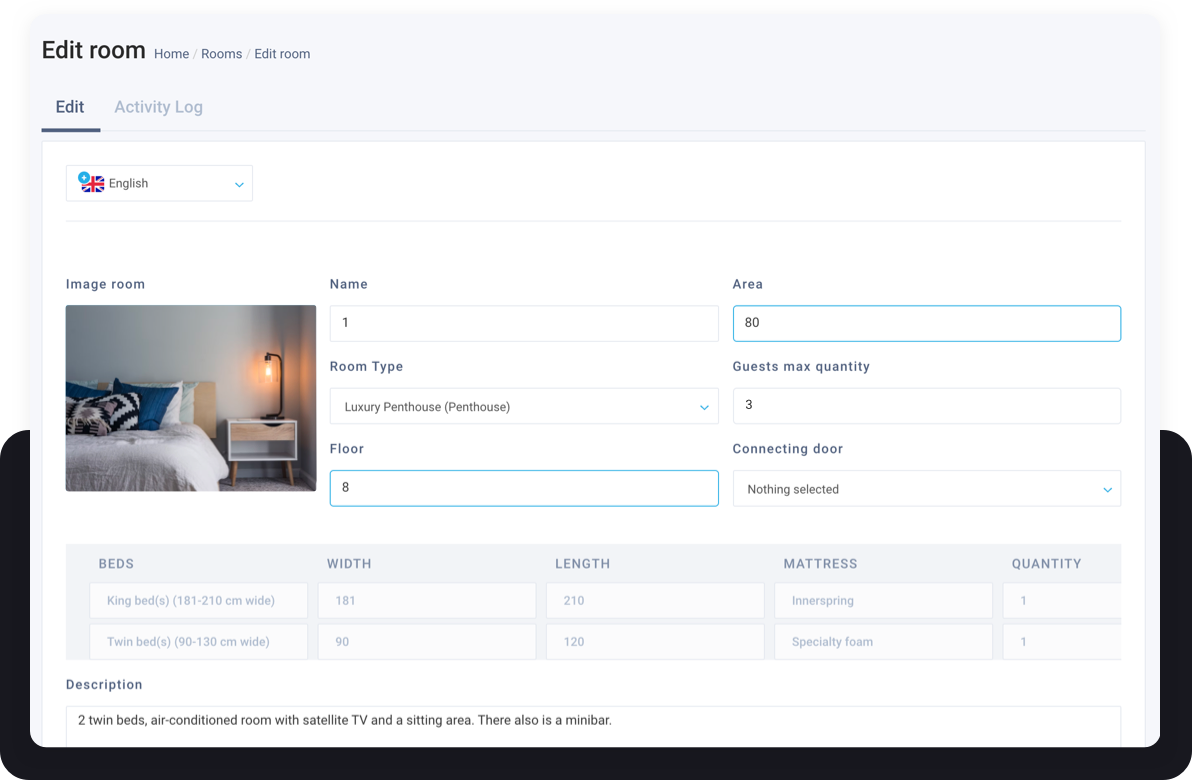
2. Add Room Details & Amenities

Enrich each room type with detailed information and amenities. Choose from our extensive library of facilities with professional icons that display beautifully on your booking engine and channel listings.

  • Specify room dimensions and floor location
  • Select from 100+ amenity options with icons
  • Add accessibility features
  • Include view type and special features

3. Upload Photos & Descriptions

Make your rooms shine with high-quality photos and compelling descriptions. Our built-in translation feature helps you reach international guests by automatically converting your content to multiple languages.

  • Upload multiple photos per room type
  • Write SEO-optimized descriptions
  • Auto-translate to 30+ languages
  • Preview how rooms appear on booking sites
Upload Photos
Manage Rooms

4. Manage & Monitor

Once set up, easily manage your entire room inventory from the dashboard. Create multiple rooms at once, change sale status, and find available rooms in seconds. All changes sync automatically to connected channels.

  • Bulk create rooms of a specific type
  • Toggle Active/Inactive status instantly
  • Search and filter rooms quickly
  • Monitor occupancy in real-time

Virtual Rooms

Combine multiple physical rooms into flexible virtual room configurations. Perfect for families, groups, or creating premium suite packages.

Create Room Combinations

Virtual Rooms allow you to bundle multiple physical rooms into a single bookable unit. Connect adjacent rooms to create family suites, combine standard rooms for group bookings, or design premium packages without physical renovations.

  • Combine 2 or more physical rooms into one virtual room
  • Perfect for connecting rooms, family suites, or group bookings
  • Sell room combinations as premium packages
  • Automatically manage availability of included rooms

Powerful Features

Everything you need to manage your hotel's room inventory effectively.

Easy Operation

Easy Operation

Handle multiple room types effortlessly with intuitive interfaces. Quick room search and filtering helps you find the perfect room for any guest in seconds.

+ Multiple room type handling

+ Quick room search & filtering

Quick Response

Quick Response

Access all room statuses and detailed parameters in real-time. Keep track of inventory data for an uninterrupted hotel life cycle.

+ All needed room statuses

+ Detailed room parameters

Awareness

Global Reach

Attract international guests with beautiful photos and descriptions in their native language. Multi-language support ensures seamless communication.

+ Attractive photos & descriptions

+ 30+ language support

Efficiency

Operational Efficiency

Streamline operations, improve organization, and optimize resource usage. Exceed customer expectations with better room management.

+ Bulk room creation

+ One-click status changes

Seamlessly Integrated

Room Management connects with other HotelFriend modules for a complete hotel management experience.

Ready to Optimize Your Room Inventory?

Get a free trial and see how HotelFriend can revolutionize your hotel management.

Schedule a Demo
HotelFriend F.A.Q.

HotelFriend F.A.Q.

How can I set up room types?
First, you need to go to "Settings", then choose "Room Types & Rooms", and click on the "Add room type" button. You can find detailed instructions on how to create all types and categories of rooms here.
Can I add multiple rooms to a room category?
Yes. You can easily and quickly add multiple rooms to a room category in the Settings section. Just go to "Rooms" and click on the "Add multiple rooms" button. Check out our full step-by-step instructions on how to set up rooms and add multiple rooms here.
How to adjust rates according to seasons?
You can manage and edit your rates, as well as change prices based on the season in the Room Rates menu. You need to go to the “Seasons" section, click on the season of interest, check the relevance of the following fields: Room rate, name, cancellation, period, enter effective prices, specify a default price for all days of the week, and save the changes. You can find detailed instructions on how to do this here.
Is it possible to set different hotel rates for children?
Yes. To set different hotel rates for children of different ages, go to the Room Rates module and click on the General tab. Then, select the answer “Yes” to the question “Are there different room rates for children than for adults?”, and click the “Save” button. Specify the cost of accommodation based on the child's age category in the “Age from” and “Age to” fields. For more detailed instructions, please follow the link.
How can I close the sale of a room on certain dates?
You can do it by assigning the Out of Service status. Just go to the “Front Desk” tab, click on the action menu opposite the number, and select Out of Service status. For more details, please follow the link.

HotelFriend Features

Hotel Management

Front-Desk

Department Management

Employee Management

Room Management

Hotel Dashboard

Housekeeping

Maintenance Management

Mobile Hotel Live Chat

Operations Outsourcing

Task Management

Finance & Payment

Accounting and Document

Payment Management

Reporting System

Booking Balance

Digital Cash Book

Revenue Management

Room Rates

Service Management

Guest Relations

Guest Management

Booking Request, Offer

Self Check-In

Guest Communications

Communication Automation

Digital Marketing

Hotel Website Development

Destination Management

Deal, Package Composer